
.png)
Description
Download AnyVoice – AI Voice Cloning, Real‑Time Speech Synthesis, Multi‑Language Tool
Overview – What Makes AnyVoice a Revolutionary AI Voice Cloning Solution
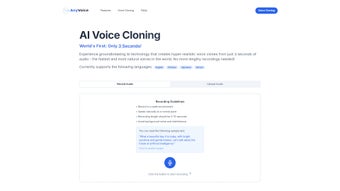
AnyVoice is an innovative, web‑based AI voice cloning platform that transforms a few seconds of spoken audio into an ultra‑realistic digital replica. Built on cutting‑edge deep‑learning models, the service captures subtle nuances such as breath, intonation, and timbre, delivering synthesized speech that feels genuinely human. The workflow is intentionally minimal: users record a short, clean sample—ideally between three and ten seconds—in a quiet environment, upload the file, and within moments the system generates a high‑fidelity voice model. This model can then be used to produce unlimited speech output in the same voice, opening doors for content creators, marketers, educators, and developers who need authentic‑sounding narration without the logistics of hiring voice talent.
The platform supports four major languages—English, Chinese, Japanese, and Korean—making it a versatile choice for global audiences. Its cloud‑native architecture ensures that processing is performed on secure servers, eliminating the need for heavy local hardware. Security and privacy are baked into the service: uploaded audio files are encrypted in transit and automatically deleted after the cloning session, complying with GDPR and other data‑protection standards. Whether you are looking to localize video tutorials, generate personalized audiobooks, or prototype voice‑enabled applications, AnyVoice delivers a fast, reliable, and cost‑effective solution that removes traditional bottlenecks.
Key Features – Why AnyVoice Stands Out in the Crowded AI Voice Market
- Instant Voice Cloning: Generate a realistic voice model from as little as three seconds of audio, with typical turnaround times under 30 seconds.
- Multi‑Language Support: Native handling of English, Mandarin Chinese, Japanese, and Korean, each with language‑specific phonetic tuning.
- High‑Fidelity Synthesis: Deep neural networks reproduce breathiness, emphasis, and micro‑prosody, creating speech that passes blind listening tests for authenticity.
- Web‑Based Interface: No software installation required; a modern browser is all you need to start cloning.
- Secure Data Handling: End‑to‑end encryption, automatic deletion of source audio after processing, and compliance with major privacy regulations.
- Customizable Output: Adjust pitch, speed, and emotional tone (e.g., friendly, authoritative) to suit specific use cases.
- API Access: Developers can integrate voice cloning capabilities into apps, games, or IVR systems via RESTful endpoints.
- Scalable Cloud Infrastructure: Handles single‑user trials and enterprise‑level batch processing without performance degradation.
- Audio Quality Assurance: Built‑in analysis warns users of background noise, clipping, or low sample rates before processing.
- Affordable Pricing Model: Tiered plans ranging from free limited trials to unlimited enterprise licenses.
Installation & Usage – A Step‑By‑Step Guide to Getting Started Quickly
Even though AnyVoice is a cloud service, a clear workflow ensures that users of any technical level can start cloning voices within minutes. Follow these steps for a smooth experience:
- Create an Account: Visit the AnyVoice homepage, click “Sign Up,” and provide a valid email address. A verification link is sent instantly; click it to activate your account.
- Choose a Plan: After logging in, you’ll see the pricing page. New users can start with the free tier, which allows up to three voice clones per month. Select “Upgrade” if you need higher limits.
- Prepare Your Audio Sample: Record a clear speech segment of 3‑10 seconds in a quiet room. Use a smartphone or external microphone, ensuring a sample rate of at least 44.1 kHz and a WAV or MP3 format. Avoid background chatter, fans, or echo.
- Upload the Sample: In the dashboard, click “Create New Clone,” then drag‑and‑drop your file or use the file picker. The platform automatically runs a quality check; if issues are detected, you’ll receive actionable feedback (e.g., “Reduce background noise”).
- Configure Voice Parameters: Optionally set the desired pitch, speaking rate, and emotional tone. These sliders give you fine‑grained control over the final output.
- Generate the Clone: Hit “Start Cloning.” The AI model is trained on the fly using a lightweight transformer architecture, and within seconds you’ll see a preview of the synthesized speech.
- Download or Stream: Once satisfied, download the generated audio in WAV or MP3, or use the provided streaming URL for integration into web pages or applications.
- API Integration (Optional): For developers, generate an API key from the “Developer” tab. The key grants access to endpoints for voice synthesis, batch processing, and real‑time streaming. Detailed documentation includes example cURL commands and SDKs for Python, Node.js, and Java.
- Manage and Delete Clones: All clones appear in the “My Voices” section. You can rename, share, or permanently delete them. Remember that source audio is automatically purged after cloning to protect privacy.
Throughout the process, AnyVoice provides inline tips and a knowledge‑base link for troubleshooting. The UI is responsive, meaning you can clone on a laptop, tablet, or smartphone without losing functionality. For enterprises, a dedicated onboarding specialist can assist with bulk uploads, custom branding, and compliance audits.
Compatibility, Pros & Cons – Where AnyVoice Excels and What to Keep in Mind
Because AnyVoice runs entirely in the browser, it is compatible with all modern operating systems that support recent versions of Chrome, Edge, Firefox, or Safari. Whether you are on Windows 10/11, macOS Ventura, Linux distributions, or mobile platforms such as Android 12+ and iOS 15+, the experience remains consistent. The only requirement is an internet connection with a minimum bandwidth of 2 Mbps for smooth upload and download of audio files.
Pros
- Speed: Voice clones are generated in seconds, dramatically reducing production timelines.
- Quality: The synthesized speech retains speaker-specific quirks, making it virtually indistinguishable from the original.
- Ease of Use: No steep learning curve; the UI guides users through each step.
- Cross‑Platform: Works on Windows, macOS, Linux, Android, and iOS without additional software.
- Security‑First: Encrypted uploads and automatic deletion protect user privacy.
- Scalable API: Enables integration into larger workflows and product pipelines.
- Multi‑Language: Native support for four major languages expands global reach.
Cons
- Internet Dependency: Requires a stable connection; offline usage is not possible.
- Sample Quality Sensitivity: Background noise or low‑quality recordings can affect clone fidelity.
- Limited Language Set: Currently supports only English, Chinese, Japanese, and Korean; other languages are planned for future releases.
- Pricing for Heavy Users: Enterprise plans can become costly for massive batch processing.
- Ethical Considerations: Potential misuse for deep‑fake content necessitates responsible usage policies.
FAQ – Frequently Asked Questions About AnyVoice
How much audio do I need to create a high‑quality voice clone?
A clean recording of 3‑10 seconds is sufficient for most use cases. The AI model leverages advanced speaker‑embedding techniques that extract voice characteristics from very short samples. However, longer recordings can improve nuance capture, especially for expressive or emotional speech.
Is my uploaded audio stored on AnyVoice’s servers?
Uploaded files are encrypted in transit and at rest, processed instantly, and then automatically deleted within 30 minutes. No personal data is retained beyond the cloning session, ensuring compliance with GDPR and CCPA.
Can I use the cloned voice for commercial projects?
Yes, under a paid subscription you receive a commercial‑use license that allows you to embed the synthesized speech in advertisements, e‑learning modules, podcasts, and other revenue‑generating content. The free tier is limited to personal, non‑commercial use.
What file formats are supported for input and output?
Input files can be WAV, MP3, or OGG with a minimum sample rate of 44.1 kHz. Output can be downloaded as high‑quality WAV (48 kHz) or compressed MP3 (128 kbps) depending on your bandwidth and storage needs.
How does AnyVoice handle different accents within the same language?
The model is trained on diverse regional datasets, allowing it to preserve the speaker’s native accent and pronunciation patterns. When you upload a sample, the AI automatically adapts to the accent present, ensuring the cloned voice sounds authentic to its linguistic background.
Conclusion – Take the Next Step with AnyVoice
AnyVoice delivers a compelling blend of speed, realism, and ease of use that positions it as a leading AI voice cloning tool for creators, developers, and businesses alike. Its web‑based architecture removes hardware barriers, while robust security measures keep your data safe. By supporting multiple languages and offering fine‑tuned control over speech parameters, the platform empowers users to produce professional‑grade audio content without the traditional time and cost constraints of voice talent.
Whether you’re looking to localize marketing videos, generate dynamic narration for e‑learning, or prototype voice‑enabled applications, AnyVoice provides a secure, scalable, and affordable solution. Ready to experience ultra‑realistic voice synthesis in seconds? Download AnyVoice now and start cloning your own voice today.
Guides & Tutorials for AI Voice Cloning
How to install AI Voice Cloning
- Click the Preview / Download button above.
- Once redirected, accept the terms and click Install.
- Wait for the AI Voice Cloning download to finish on your device.
How to use AI Voice Cloning
This software is primarily used for its core features described above. Open the app after installation to explore its capabilities.
User Reviews for AI Voice Cloning 0
No reviews found




